14 Temmuz 2011 Perşembe

198. Yazılım VIII. Q-Dir

Q-Dir 4.65 çıktı. Tek ekranda dört klasörün aynı anda izlenebildiği hafif sıklet dosya yönetici programı.


Q-Dir (the Quad Explorer) makes your files and folder easy to manage, as an installed or portable Windows program. Fast and easy access to your hard disks, network folders, USB-Stiks, floppy disks and other storage devices. Q-Dir is a good file manager with an amazing Quadro-View technique. You don't have to renounce the usual, Drag and Drop, all Views, and other functions of your system. No! Q-Dir gives you other nice functions, that make you happy. One can save many hand moves and also time! Q-Dir does not have to be installed and can be executed easily from the desktop, and can be carried on a small usb-stick or other memory device.

More about QDir

The file management in Q-Dir is based on MS Windows Explorer but 4x plus Tabs and with more functionality! Start the program. The first time that you use it the program it will present you with a license screen. The program is free and the license info is only displayed the first time (per PC). Operating systems: Windows 7, Windows Server 2008, Windows Vista, Windows 2003, Windows XP, Windows 2000, Windows Me, Windows NT, Windows 98

13 Temmuz 2011 Çarşamba

197. Yazılım VII. Atlantis Sözcük İşlemci

Atlantis Word Processor 1.6.5.7 çıktı.


Summary Of Atlantis Features

In Atlantis Word Processor, the traditional word processing functions have been designed for maximum efficiency. But this is not all! Atlantis has many innovative and unique features that make word processing easier and more effective.

THE WORD PROCESSING FUNCTIONS:

Document creation and formatting is easy, using a customizable and expandable collection of document templates and sample letters. Comprehensive Style Sheet support is available for advanced users. A customizable and expandable Clip Library is stocked with text and graphic items ready to be inserted in larger documents whenever suitable. The Atlantis original collections of clips include everyday phrases, letter writing elements, clip art, etc. Of course, all the traditional font and paragraph formatting commands are present:

choice of typeface, font size, font color. A state of the art typeface preview. bold, italic, underline, strikeout, double strikeout, superscript, subscript, small caps, all caps, shadow, outline, emboss, engrave. choice of 17 underline styles; choice of underline color. character spacing, scaling, kerning, vertical offset. fully customizable tab stops. left/right paragraph indent, first line indent and outdent. spacing before/after paragraph, 6 types of interline spacing. keep with next paragraph, keep intact, page break before, widow/orphan control. and plenty more, only a key press or mouse click away...

More than 20 fields are supported. The corresponding items are quickly inserted and automatically updated by Atlantis. Fields make document and template creation very flexible. What's more, we have made sure that fields are not restricted to advanced users: using fields in Atlantis is child's play! Words can be hyphenated across lines automatically or manually. You can create newspaper-type columns, divide documents into sections, each section with its own page settings. You have two graphic-type formatting modes to change font color and highlight text. You will use specific mouse pointers to format text in the same way as you would with a paint brush. Atlantis introduces a revolutionary approach to document formatting with a Format Palette and Brush. Even the most complex formatting jobs can be done exclusively with a brush-like mouse cursor and a palette loaded with formatting templates. You can use the Atlantis default palette or customize your own format palettes in any way you like. The Format Palette is only one of the instruments present on the Atlantis Control Board. The Atlantis Control Board brings together all the tools and commands that are required to create both simple and complex documents with the greatest of ease. Each panel of the Atlantis Control Board is dedicated to one specific characteristic of the active document. You have separate overviews of the document Headings, Bookmarks, Sections, Styles, or Lists, with all the related commands directly available from each specific panel of the Control Board. Tools and commands to manage Headings are on hand on the "Headings" panel, tools and commands to manage Bookmarks are on hand on the "Bookmarks" panel. Etc. This gives you unequaled power and flexibility. The AutoCorrect feature of Atlantis has fully customizable multilingual options, and will dramatically simplify your word processing life. It combines flexibility with power for unparalleled control over the typing and formatting of documents. Some of the Atlantis AutoCorrect functions are still unheard-of in today's top-end word processors. Texts are proofread in the background "As-You-Type", or, optionally, when typing is complete. A multilingual spellchecker will help you create documents with perfect language. Spelling is checked "As-You-Type", or, again, optionally, when typing is complete. Original Atlantis Spellcheckers are available for 16 languages or dialects. And of course, you can create and augment as many custom dictionaries as you wish. Power Type is a typing assist adding unique functionality to Atlantis. Working in close cooperation with our proprietary spellchecker engine, Power Type collects statistical information about the texts that you type, creating a smart database of the words that you use most, and also of their usual environment. When you start typing the same words again, Atlantis gives a warning sound, pops a small window up, and displays a list of words beginning with the same characters. But this is not all. The Atlantis Power Type has learning abilities. As time goes by, the Power Type database gets smarter, and you will notice that the typing suggestions are more and more appropriate. Of course, the Atlantis Power Type is invaluable for people with disabilities. But also for slow "one-finger" typists. The Overused Words feature will help creative writers avoid repetitions and clichés if they want their texts to be read with any interest or pleasure. The Overused Words feature will show detailed statistics about repetitions and word frequency. This will tell you where words need to be replaced with synonyms, or whole paragraphs reworked. To improve the reading and understanding of the documents you create in Atlantis, you can add bookmarks, hyperlinks, table of contents to them. Atlantis can build table of contents automatically at the press of a few keys. All documents created in Atlantis can be "Saved As Web Page", i.e. saved as HTML. This will help owners of personal Web sites, and also e-book creators tremendously. Atlantis also has a command to convert any document to an eBook with just a few mouse clicks. You will find comprehensive support for all types of lists, bulleted and numbered, whether simple (one level) or outline (multilevel). Where numbered lists are concerned, we have placed the highest emphasis on reliability. You will design foolproof numbering schemes from simplest to most complex with the greatest of ease. And, uniquely, you will be able to fix the wrong numbering of lists created in other not so smart word processors. Headers and footers are fully supported. And so are footnotes and endnotes. You can insert footnotes and/or endnotes, choosing from a wide range of different reference marks. What's more, and quite uncommonly, you can configure footnotes and endnotes differently from one document section to the other.

THE INTERFACE IS FULLY CUSTOMIZABLE:

Atlantis can be customized to suit your own needs and preferences: the menus, hot keys, and toolbars are fully customizable on a per-user basis. Each particular toolbar can be toggled on and off at will. You can choose from a variety of proprietary Color Schemes to personalize the Atlantis GUI. You can even create your own Atlantis Color Schemes. Original background Sound Schemes can be used, modified, or created anew. You can have favorite fonts: Atlantis will automatically place them at the top of the font list. You can even choose to have a menu with your favorite fonts only. Just as any other software, Atlantis will normally ask confirmation before going ahead and carry out important actions like saving files or deleting items. If you always click the same button (Yes, No, Ignore, etc) in such dialogs, you can save a custom default answer for each of them individually and de-activate the corresponding message dialog. Of course each of these confirmation messages can be re-activated on demand. Do not worry if several persons share your PC: you can create individual desktop shortcuts so that each can have their own configuration of options to launch Atlantis with. If you are a power user, you will take advantage of a whole array of command-line parameters to launch Atlantis with specific options.

HANDLING DOCUMENTS IS EASY:

Atlantis has a Multiple Document Interface (MDI). You can open as many documents as you want. Navigation among open documents is quick and easy, using a Document Bar with name-tabs. With drag & drop, the name-tabs can even be reordered in any suitable way. And, just like the Windows Taskbar, the Atlantis Document Bar can be resized to accomodate multi-tier rows of document name-tabs. A dual set of commands is available for each of the 4 toolbars: at the flick of a switch, you will alternate between the Atlantis Main and Alternative sets of toolbar commands. Both a horizontal and a vertical ruler can be displayed with full state-of-the-art controls. The wheel mouse advanced functions are fully supported. You can use the Easy Hand "grabbing" mode of the cursor to navigate effortlessly up and down documents. Scrolling up and down documents is done "live" and with great precision. Most commands are available at the click of a button or at the press of a hot key. A favorite working folder can be assigned to Atlantis. Often used documents can be registered as "favorites" for quick and easy access. You can specify which supported file types will automatically open in Atlantis following a double-click in Windows Explorer. Atlantis has internal commands to compress and save as Zip the active document, or all open documents. You can attach documents to a message directly from Atlantis, using the Send by Email command. You can send documents "AS IS", or as compressed ZIP files. The file zipping is done by Atlantis. The printing options are those of a top-class word processor: printing range, reverse order, odd/even pages, number of copies, collate, scaling to paper size, two-sided printing on duplex and non-duplex printers, printing simple and compound booklets, economy mode with 1 to 16 pages per sheet. And two special Atlantis command-line switches to send documents directly to the printer without displaying any dialog. Using the Atlantis Address Books, envelopes can be created for single or multiple addressees, attached to documents, and printed for private or bulk mail use. 

DOCUMENT VIEWING IS VERY COMFORTABLE:

Print Layout and Draft view modes. The Atlantis display is unflickering, and 100% WYSIWYG. A "Full Screen" mode is available to maximize the working space. You can choose from a whole array of zooming factors (including "Page width" and "Text width") to fine-tune the document onscreen display. A "Magnifying Glass" tool is on hand for instant high/low magnification of a fragment of text. The "Preview" mode gives you perfect control over the printed output.

DOCUMENT EDITING IS MOST CONVENIENT:

Fragments of text are easily selected with keyboard or mouse. Selections can be done in the traditional way by full lines or paragraphs. But you can also select multiple fragments of non-contiguous text. Or whole "column blocks", if suitable. You can activate an option so that whole words are automatically selected by the mouse pointer. Drag & Drop editing is fully supported: you can move or duplicate text to another location with a simple glide of the mouse pointer. You can duplicate a selection, change its case pattern, or move it up or down with the cursor keys. Using a "Paste As Environment" special option, the clipboard contents can be pasted so that they blend in with the formatting found at the insertion point. You can insert files, pictures, special symbols, the current date or time, addresses, etc. Addresses can be imported from CSV files, e.g. from MS Outlook Express. The color count of inserted pictures can be reduced to minimize the document size. Atlantis has a smart Cut & Paste feature with automatic management of blank spaces. You have a very practical Click & Type function: you can double-click any blank area on the page to start typing from there. There is unlimited undo/redo, Group Undo, Undo After Save. The "Find/Replace" dialog has a very useful "Find And Select All" option. When you have found and selected non-contiguous fragments of document in such a way, you can format them all at one go in any suitable way, or you can copy or move them. Paragraphs can be sorted in ascending or descending order. Page numbering is fully supported. You can easily get detailed statistics on a selection of text or on the whole document. You can send selections of text directly to the printer. You can save selected portions of document as RTF, DOC, DOCX, or COD files; pictures as graphic files. You can store multiple clipboard items for later retrieval in a most practical Clippy Bank. Items that you send to the Windows clipboard are stored by Atlantis, and are made available from a pull-down clipboard menu on the Atlantis toolbars. Writing time & speed can be displayed on the status bar. A "Calculate" function adds computational capability to traditional word processing.

DOCUMENTS ARE SAFE WITH ATLANTIS:

Against system lock-ups or crashes, Atlantis can automatically safeguard all open documents at regular intervals. Atlantis can also create automatic and regular backups of all open documents. Successive versions of each document are saved to a special folder. In this way, you can always go back to earlier versions of your working documents. You can create documents in a proprietary encrypted COD file format. Atlantis uses a very powerful 256-bit encryption algorithm. With Atlantis, your private documents are as safe as Fort Knox!

DOCUMENT SUPPORT IS COMPREHENSIVE:

Document size is literally unlimited. Multiple document formats are supported, insuring maximum portability on all systems: RTF, MS Word DOC 6.0/95/97/2000/XP/2003, DOCX, etc. Batch conversion. Support for document projects. Multiple graphic formats can be used to complement text: BMP, EMF, WMF, JPG, GIF, PNG, PCX, TGA, TIF, PCD, etc. You have an option to save documents in a supercompact lightweight RTF format. Combined with the Atlantis internal Zip compression, this option is ideal for files traveling on the Internet. 

196. Yazılım VI. Foxit PDF Reader

Foxit PDF Reader Portable 5.0.1.0523 çıktı.


Foxit Reader Portable
small and fast PDF Reader

Foxit Reader is a free PDF document viewer, with incredible small size, breezing-fast launch speed and rich feature set. It's packaged as a portable app, so you can view PDF files on the go.

195. Yazılım V. DjVu Browser Plug-in

DjVu Browser Plug-in 6.1.4 r26155 çıktı. Bu tarayıcı eklentisi djvu dosyalarını tarayıcı ile doğrudan okumayı sağlıyor.


The DjVu Browser Plug-in is the primary means of viewing DjVu documents. It runs inside most modern browsers such as Internet Explorer, Firefox and Safari.

194. Yazılım IV. DjvuLibre

DjVuLibre 3.5.24 ve DjView 4.7c çıktı.


DjVu is a web-centric format and software platform for distributing documents and images. DjVu can advantageously replace PDF, PS, TIFF, JPEG, and GIF for distributing scanned documents, digital documents, or high-resolution pictures. DjVu content downloads faster, displays and renders faster, looks nicer on a screen, and consume less client resources than competing formats. DjVu images display instantly and can be smoothly zoomed and panned with no lengthy re-rendering. DjVu is used by hundreds of academic, commercial, governmental, and non-commercial web sites around the world. 

DjVuLibre is an open source (GPL'ed) implementation of DjVu, including viewers, browser plugins, decoders, simple encoders, and utilities. DjVuLibre includes a standalone viewer, a browser plug-in (for Mozilla, Firefox, Konqueror, Netscape, Galeon, and Opera), and command line tools (decoders, encoders, utilities). DjVuLibre works under Unix with X11. Native plugins for MS Windows and Mac OS X are freely available from LizardTech Inc.. The new portable viewer djview4 is available as a separate package.

djview4 [options] [argument]

DESCRIPTION
Standalone viewer for DjVu files. Features include navigating documents, zooming and panning page images, producing and displaying thumbnails, displaying document outlines, searching documents for particular words in the hidden text layer, copying hidden text to the clipboard, saving pages and documents as bundled or indirect multi-page files, and printing page and documents. The viewer can simultaneously display several pages using a side-by-side or a continuous layout.

193. Yazılım III. CCleaner

CCleaner 3.08 çıktı.  Türkçe desteği mevcut.


CCleaner
Optimization and Cleaning

CCleanerCCleaner is the number-one tool for cleaning your Windows PC. It protects your privacy online and makes your computer faster and more secure. Easy to use and a small, fast download.

192. Yazılım II. IrfanView

IrfanView 4.30 çıktı. IrfanView, ücretsiz grafik görüntüleme yazılımıdır.


What is IrfanView?

IrfanView is a very fast, small, compact and innovative FREEWARE (for non-commercial use) graphic viewer for Windows 9x, ME, NT, 2000, XP, 2003 , 2008, Vista, Windows 7. It is designed to be simple for beginners and powerful for professionals. IrfanView seeks to create unique, new and interesting features, unlike some other graphic viewers, whose whole "creativity" is based on feature cloning, stealing of ideas and whole dialogs from ACDSee and/or IrfanView! (for example: XnView has been stealing/cloning features and whole dialogs from IrfanView, for 10+ years). IrfanView was the first Windows graphic viewer WORLDWIDE with Multiple (animated) GIF support. One of the first graphic viewers WORLDWIDE with Multipage TIF support. The first graphic viewer WORLDWIDE with Multiple ICO support.

Some IrfanView features:

Many supported file formats (click here the list of formats)
Multi language support
Thumbnail/preview option
Paint option - to draw lines, circles, arrows, straighten image etc.
Toolbar skins option
Slideshow (save slideshow as EXE/SCR or burn it to CD)
Show EXIF/IPTC/Comment text in Slideshow/Fullscreen etc.
Support for Adobe Photoshop Filters
Fast directory view (moving through directory)
Batch conversion (with image processing)
Multipage TIF editing
File search
Email option
Multimedia player
Print option
Support for embedded color profiles in JPG/TIF
Change color depth
Scan (batch scan) support
Cut/crop
IPTC editing
Effects (Sharpen, Blur, Adobe 8BF, Filter Factory, Filters Unlimited, etc.)
Screen Capturing
Extract icons from EXE/DLL/ICLs
Lossless JPG rotation
Unicode support
Many hotkeys
Many command line options
Many PlugIns
Only one EXE-File, no DLLs, no Shareware messages like "I Agree" or "Evaluation expired"
No registry changes without user action/permission! 

191. Yazılım I. Doro PDF Writer

Doro PDF Writer 1.64 çıktı. Bu ücretsiz yazılım ile PDF dosya oluşturulabilir.


Doro::Create PDF files for free

Description:

The setup contains all what you need for creating pdf files. After installation you have an additional printer called 'Doro PDF Writer'.  So you can create a colored PDF file from any windows program for free. No banners nor any annoying restrictions! 

•Simply start Word©.
•Write your document, also colored pictures can be included.
•Select on the print dialog the printer labeled 'Doro PDF Writer' and press 'OK'.
•On the Doro window which appears after that, you can specify some additional options.
•press 'Create'.
•Now you have a colored pdf file.  

You can encrypt the pdf with 128-bit password protection. Further, 'copy and paste' and printing can be prevented.  This printer is working under Windows 7 [32 and 64 Bit] / Vista [32 and 64 Bit] / 2003 Server [incl. Terminal Services / Citrix XenApp with multiple concurrent users] [32 and 64 Bit] / XP [32 and 64 Bit] / 2000 / NT4 and Windows ME / 98SE / 98 / 95.  The user interface is available in English, German, French and Portuguese.

190. Satranç Olimpiyat Oyunlarında!

Satranç, olimpik spor olarak olimpiyatlarda nihayet yer alıyor.

PH endorses chess for Winter Olympics
abs-cbnNEWS.com Posted at 07/10/2011 1:56 PM | Updated as of 07/10/2011 1:56 PM

MANILA, Philippines – The Philippines became the first country to officially endorse the inclusion of chess in the 2014 Russia Winter Olympics. This was after FIDE President Kirsan Ilyunzhinov paid a courtesy visit to Philippine Olympic Committee (POC) President Jose “Peping” Cojuango last Friday. Cojuango was the first national Olympic committee leader to sign the endorsement letter addressed to the International Olympic Committee (IOC). "Chess is a legitimate sport played internationally. Its inclusion (in the Olympics) is long overdue," said Cojuango. "It will also give us the opportunity to compete in the Winter Games again." The Philippines last sent a delegation to the quadrennial event in 1994. National Chess Federation of the Philippines (NCFP) President Prospero "Butch" Pichay accompanied Ilyumzhinov in the courtesy visit. He lauded Cojuangco for supporting the initiative. "We have several world-class chess players, and they are mostly young," said Pichay. "If the breaks go our way, we can even produce a medal in world competitions." "There is no better setting for us to showcase our talent than the Olympics," Pichay said. Ilyumzhinov has been lobbying to add chess in the Olympic calendar for some time now. He is currently touring Asia to seek the support of IOC members from the region. According to Ilyumzhinov, around 50 IOC members have already vouched their support for the inclusion of chess in the 2014 Winter Olympics. The Philippines was the first to put it in writing. The IOC has 116 voting members. "We need to get a majority vote from the IOC members to make it happen," said Ilyumzhinov. "So far, we’re getting positive response from most of them."

By Marlon Bernardino


Ekleme: 00:53 03 Ağustos 2011 Çarşamba


Request of Philippines to include chess to the Olympic Games programme
Sunday, 10 July 2011 02:30


A historical event took place in Manila, Philippines. During a working visit of the FIDE President, Kirsan Ilyumzhinov, to the Philippines, the Head of the National Olympic Committee (NOC), Mr. Jose Cojuangco Jr., signed an appeal to the Head of the International Olympic Committee (IOC), Mr. Jacques Rogge, and IOC members, requesting the inclusion of chess in the programme of the Olympic Games. Kirsan Ilyumzhinov noted: "We are working towards the goal of including chess in the programme of the Olympic Games. Following on from our longstanding consultations with the IOC and its Head, Mr. Jacques Rogge, it has become clear that we have good chances, but we need active support from the national federations and Olympic Committees. We set ourselves, as a priority, an ultimate goal to collect letters, containing such a request, from the NOCs of all 170 FIDE member countries. There is no obvious reason why these letters have not yet appeared; I have made great efforts. I would like to express my gratitude to the President of the National Chess Federation of the Philippines, Mr. Prospero A. Pichay Jr., and to the President of the Philippines NOC, Mr. Jose Cojuangco Jr., who were the first to respond to our request." The FIDE President hopes that this event will now provoke "a chain reaction" in the other countries. Kirsan Ilyumzhinov asserts that everybody should help with this - representatives of the federations, chess players, trainers, organizers and the millions of chess fans all over the world.  Let us remind you that during the elections in Khanty Mansiysk, Kirsan Ilyumzhinov trageted three main areas for his activity as FIDE President: development of the programme "Chess in Schools", training of trainers and arbiters, and working towards the inclusion of chess in the Olympic Games. He notes: "We have already achieved great success in two of these areas. There is no doubt that the consolidated efforts of FIDE, our national chess federations and their NOCs will maximize our chances in our work of persuading the IOC to bring to fruition our third objective."
 

189. 2012 Dünya Şampiyonası II. Maç Hindistan'da

2012 Dünya Şampiyonası, Hindistan Chennai'da düzenlenecek.


Anand to defend world title in Chennai


CHENNAI: Chennai will host the World Chess Championship title match between defending champion Viswanathan Anand and Boris Gelfand of Israel in April-May next year. Chief minister J Jayalalitha has assured Tamil Nadu government's support for the high-profile match. According to an official statement on Wednesday, World Chess Federation president Kirsan Illyumzhinov met the chief minister. The nature or extent of government support for the best-of-12 match series with a projected expenditure of Rs 20 crores could not be ascertained. Anand had won the title in 2010 defeating Veselin Topalov 6.5-5.5 in Bulgaria and will be defending the crown against the 43-year old Gelfand, who qualified by winning the Candidates Tournament.

188. Yazışmalı Satranç

sakoo (1817) - harun (1844) [A85]
Partie Officielle (Cadence 30 j + bonu EchecsOnline.net (1), 13.07.2011


1.Nf3 f5 2.d4 Nf6 3.c4 g6 4.Nc3 Bg7 5.Bg5 0-0 6.e3 d6 7.Be2 c6 8.0-0 Qe8 9.Rc1 h6 10.Bxf6 Bxf6 11.e4 e5 12.dxe5 dxe5 13.Re1 Qe7 14.Qc2 Na6 15.a3 f4 16.b4 Nc7 17.h3 Ne6 18.c5 Kg7 19.Bf1 Nd4 20.Nxd4 exd4 21.Ne2 Be5 22.Rcd1 Qf6 23.f3 Be6 24.Nc1 Qf7 25.Qd2 Rad8 26.Nd3 Bc7 27.Qb2 g5 28.Rd2 Qd7 29.Nf2 h5 30.Red1 Qe7 31.Be2 Kh6 32.Re1 Qf7 33.Bd1 Rg8 34.e5 Qg7 35.Qc2 Bd5 36.Rxd4 Bxe5 37.Rd3 Bd4 38.Kh1 Be3 39.Kh2 Rde8 40.Ne4 g4 41.Nd6 g3+ 42.Kh1 Re5 43.Rdxe3 fxe3 44.Nf5+ Rxf5 45.Qxf5 Re8 46.Qf4+ Qg5 47.Qxg5+ Kxg5 48.Be2 Bb3 49.Rb1 Ba4 50.Kg1 Rd8 51.Kf1 Rd2 52.b5 Bxb5 53.Bxb5 cxb5 54.Rxb5 Rf2+ 55.Ke1 Kh6 56.Rxb7 Rxg2 57.Re7 Rg1+ 58.Ke2 g2 0-1


Bitiş konumu:

12 Temmuz 2011 Salı

187. Blog tatile çıkınca ne olur?

İşte bu olur! :(


Mühimmat deposu patladı, Rum üssü savaş alanına döndü
REMZİ SAMAR LEFKOŞA, CİHAN - 12.07.2011

Rum Milli Muhafız Ordusu'na (RMMO) ait Evangelos Florakis Deniz Üssü'nde, üç yıl önce el konulan bir gemiden indirilen konteynerlerdeki mühimmatın patlaması sonucu en az 12 kişi hayatını kaybetti, 50'den fazla insan yaralandı. Ölenler arasında üs komutanı Andreas Yoannidis'in de bulunduğu açıklandı. Patlama üzerine Rum Dışişleri Bakanı Markos Kiprianu Avrupa Birliği'nden yardım istedi. Kıbrıs Rum yönetimi lideri Dimitris Hristofyas da olay yerine gitti ve Rum Bakanlar Kurulu'nu olağanüstü topladı. Rum Savunma Bakanı Kostas Papakostas ve Rum Ordusu Komutanı Korgeneral Petros Çalikidis 12 kişinin öldüğü patlamanın ardından istifa etti. Patlama nedeniyle deniz üssünün hemen yanındaki Vasiliko elektrik santralinde de yangın çıktı. Yangın kontrol altına alındı, ancak santralde büyük hasar meydana geldi. Bu nedenle Rum Kesimi'nin büyük kısmına elektrik verilemiyor. Sabah erken saatlerde meydana gelen patlamadan sonra deniz üssüne çok sayıda ambulans ve itfaiye sevk edilirken, deniz üssünün dışındaki alan ise bombardımana uğramış görüntüsü veriyor. Üsse giden yol, parçalanmış boru, dal ve araçların kırılmış camlarıyla dolu. Patlama anında Limasol-Güney Lefkoşa anayolunda seyreden araçların sürücüleri büyük tehlike yaşadı. KKTC Başbakanı İrsen Küçük, Kıbrıs Rum kesiminde askerî deniz üssündeki patlamadan ve Vasliko'daki elektrik santralinin devre dışı kalmasından üzüntü duyduklarını belirterek, Rum tarafından talep gelmesi halinde KKTC'nin sağlık ve elektrik iletimi konusunda yardımda bulunmaya hazır olduğunu açıkladı. 

186. Bilgisayar Satrancı. Fire 2.2

Fire 2.2 geçen hafta çıkmış. Konya'ya fazla yoğunlaştığımdan ve aşırı nemin etkisinden olsa gerek bunu atlamışım.


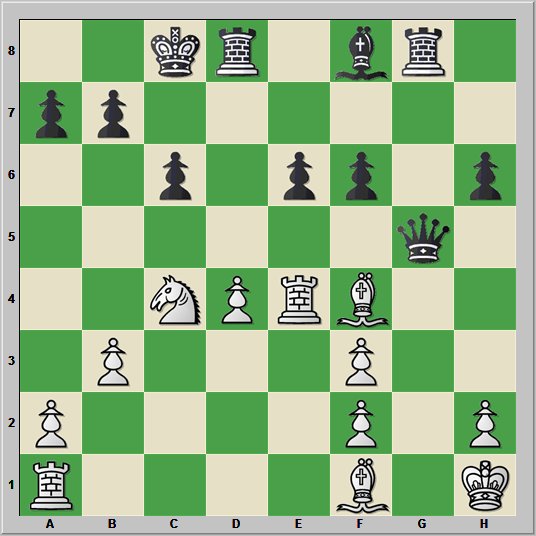
185. Yazışmalı Satranç. Taktik Alıştırma

Hamle beyazlarda.

kamel52 (1780) - harun (1820) 11. ... A7b6

Bu konumda beyazların stratejisi ne olmalıdır?

Hamle siyahlarda.

23. Fxf4 ?

11 Temmuz 2011 Pazartesi

184. Bilgisayar Satrancı VIII. Konumsal Değerlendirme

Topalov - Shirov, Linares 1998 47. Şg1 

Bu konumda, Shirov 47. ... Fh3! hamlesini oynadı ve birkaç hamle sonra oyunu kazandı. İzleyen iletilerimizde bilgisayar programlarının bu konumdaki hamlelerini irdeleyeceğiz. Maçı, ChessBase için çözümleyen L Ftacnik Fh3 hamlesini iki ünlem ile bezemiş. 47. ... Fh3!! (Ftacnik)


Fritz 12 

8/8/4kpp1/3p1b2/p6P/2B5/6P1/6K1 b - - 0 1

Fritz 12 1CPU çözümlemesi: d: 30

1. -+ (-3.07): 47...a3 48.Kf2 Be4 49.g4 f5 50.Kg3 fxg4 51.Kxg4 a2 52.Bd4 Kd6 53.Kf4 Kc6 54.Ke3 Kb5 55.Kd2 Kc4 56.Ke3 Bf5 57.Bf6 Bd3 58.Ba1
2. -+ (-3.01): 47...Be4 48.Bb2 f5 49.Kf2 Kd6 50.g3 Kc5 51.Ke3 Kb4 52.Bd4 Kc4 53.Bf6 a3 54.Bd4 a2 55.Bf6 Kc5 56.Bd4+ Kb5 57.Bf6 Kc4 58.Bd4 Bf3 59.Be5 Bd1 60.Bd4

(, 11.07.2011)

[Sürecek]

Sırada Rybka 4 var.

8/8/4kpp1/3p1b2/p6P/2B5/6P1/6K1 b - - 0 1

Deep Rybka 4 x64 2CPU çözümlemesi: d=28

1. -+ (-1.98): 47...a3 48.Kf2 Be4 49.g4 f5 50.Kg3 fxg4 51.Kxg4 a2 52.Bd4 Kd6 53.Kf4 Kc6 54.Ke5 Kb5 55.Kf4 Kc4 56.Ke3 Bf5 57.Ba1 Bg4 58.Bd4 Bd7 59.Ba1 Bf5 60.Be5 Bc8 61.Ba1
2. -+ (-1.90): 47...Be4 48.Bb2 f5 49.g3 Kd6 50.Bc1 Kc5 51.Kf1 Kc4 52.Ke1 Kb3 53.Be3 a3 54.Kd2 f4 55.gxf4 Kb2 56.Bf2 a2 57.Bd4+ Kb1 58.Be5 a1Q

(, 13.07.2011)

Çözümleme sürerken son değerlendirme: -+ (-20.91) 47...Be4 48.Bb2 f5 49.g3 Kd6 50.Bc1  idi.

[Sürecek]

Rybka 4.1 4CPU ile sürdürüyoruz:

Deep Rybka 4.1 SSE42 x64 4CPU:

d: 32  1. & 2. 47. ... a3 & Fe4 -+ (-2.05)

Çözümleme sürerken son değerlendirme: Fh3 (12/13) belirsiz  idi. Süre: 45 dakika.

  (, 16.07.2011)

[Sürecek]

Şimdi 5 taşlı Gaviaota oyun bitimi tablolarını kullanan Houdini 1.5a x64 4CPU sırada.

d: 29  1.  -+ (-5.00): 47. ... Fh3 48. g3 Şf5 49. Şf2 Şe4   Süre: 15 dakika.

   (, 16.07.2011)

[Sürecek]

IvanHoe B47cBx64a 4CPU ile devam ediyoruz.

d: 29 
 
1. -+ (-4.55)  47. ... Fh3 48. g3 Şf5 49. Şf2 Şe4   Süre: 25 dakika.
2. -+ (-1.99) 47. ... Fe4 48. g3 f5 


  (, 16.07.2011)

[Sürecek]

Deep Rybka 4.1 SSE42 x64 4CPU yeniden çalıştırdım. İki saat boyunca d 32 -+ (-2.31) 47. ... Fe4 & a3 ve Fh3 (12/13) belirsiz değerlendirmesini yaptı. Nalimov kullanma oranı 36 (default) idi. Bu rakamı 90 yaparak bir kez daha sınadım. İki saat sonunda Fe4 hamlesi asıl varyant olarak öneriliyordu.


[Sürecek]

Çözümleme kaydı:

1781406: Topalov,V - Shirov,A, Linares 15th 1998
8/8/4kpp1/3p1b2/p6P/2B5/6P1/6K1 b - - 0 1

Analysis by Deep Rybka 4.1 SSE42 x64: 4cpu d: 32

1. -+ (-2.05): 47...a3 48.Kf2 Bc2 49.Ke3 Kf5 50.g3 Kg4 51.Bxf6 Kxg3 52.Kd4 Be4 53.Kc3 a2 54.Kb2 Bb1[] 55.Kc1[] Kf3 56.Kd2 Ke4 57.Bc3 Kf4 58.Ba1 Kf5 59.Ke3 Be4 60.Kd4 Kg4 61.Kc3 Kxh4 62.Kb3 Bb1
2. -+ (-2.05): 47...Be4 48.Kf2 Kf5 49.g3 a3 50.Ba1 a2 51.Bb2 Bh1 52.Ke3 Kg4 53.Bxf6 Kxg3 54.Kd2 Be4 55.Kc1 Bb1 56.Kd2 Kf4 57.Ke2 Bc2 58.Bb2 Kg4 59.Kd2 Bf5 60.Bf6 Bb1 61.Ke3 Kg3 62.Kd2 Kf4

(, 16.07.2011)


4: Topalov,V - Shirov,A, Linares 15th 1998
8/8/4kpp1/3p1b2/p6P/2B5/6P1/6K1 b - - 0 1

Analysis by Houdini 1.5a x64: 4cpu d: 28

1. -+ (-1.41): 47...Be4 48.g3 f5 49.Kf2 Kd6 50.Bb4+ Ke5 51.Bc3+ d4 52.Bb2 Kd5 53.Ke1 Kc4 54.Kd2 d3 55.Bh8 a3 56.Kd1 Kb3 57.Kc1 Kb4 58.Kd2 Kb5 59.Ba1 Kc4 60.Bc3 Kb3 61.Be5 a2 62.Bc3 Kc4 63.Bb2 Bf3 64.Ba1 Bc6 65.Kd1 Bd5 66.Kd2 Bc6 67.Kd1
2. -/+ (-1.29): 47...a3 48.Kf2 Be4 49.g4 a2 50.Kg3 f5 51.Bd4 fxg4 52.Kxg4 Kd6 53.Ba1 Kc6 54.Kf4 Kc5 55.Ke3 Kc4 56.Bd4 Bc2 57.Ba1 Ba4 58.Bd4 Be8 59.Bf6 Bc6 60.Bh8 Bd7 61.Bg7 Kc5 62.Bd4+ Kb5 63.Kd3 Bf5+ 64.Kd2 Kc4 65.Ke3 Bg4 66.Be5 Bc8 67.Ba1 Bb7 68.Kd2 d4 69.Kc2

(, 16.07.2011)


4: Topalov,V - Shirov,A, Linares 15th 1998
8/8/4kpp1/3p1b2/p6P/2B5/6P1/6K1 b - - 0 1

Analysis by Houdini 1.5a x64:

1. -+ (-5.00): 47...Bh3 48.g3 Kf5 49.Kf2 Ke4 50.Bb2 Kd3 51.Ke1 Bg4 52.Kf1 f5 53.Kf2 Kd2 54.Bf6 a3 55.Be7 a2 56.Bf6 Kd3 57.Bb2 Kc2 58.Bf6 Bh3 59.Ke3 Kb1 60.Kd3 a1Q 61.Bxa1 Kxa1 62.Kc2 Bg2 63.Kc3 Kb1 64.Kb3 Be4 65.Ka3
2. -+ (-1.41): 47...Be4 48.g3 f5 49.Kf2 Kd6 50.Bb4+ Ke5 51.Bc3+ d4 52.Bb2 Kd5 53.Ke1 Kc4 54.Kd2 d3 55.Bh8 a3 56.Kd1 Kb3 57.Kc1 Kb4 58.Kd2 Kb5 59.Ba1

(, 16.07.2011)


4: Topalov,V - Shirov,A, Linares 15th 1998
8/8/4kpp1/3p1b2/p6P/2B5/6P1/6K1 b - - 0 1

Analysis by Ivanhoe B47cBx64a:

1. -+ (-1.99): 47...Be4 48.g3 f5 49.Kf2 Kd6 50.Bd4 Kc6 51.Ke3 Kb5 52.Bb2 Kc4 53.Ba1 a3 54.Bg7 Bd3 55.Be5 a2 56.Bh8 Bf1 57.Ba1 Bh3 58.Bg7 Bg4 59.Bd4 Bf3 60.Bb2 Kb3 61.Ba1 Bg4 62.Kd3 Bf3 63.Kd2 Bh1 64.Kc1 Bf3 65.Be5 Bh5 66.Ba1 Be2 67.Be5 Bd3 68.Ba1 Be2
2. -+ (-1.86): 47...Bb1 48.Kf2 Kf5 49.Ke3 a3 50.g3 a2 51.Kd4 Be4 52.Ke3 Kg4 53.Bxf6 Kxg3 54.Kd2 Kf3 55.Ba1 Bf5 56.Bc3 Ke4 57.Ba1 d4 58.Bb2 Be6 59.Ba1 Bc4 60.Bb2 Bf1 61.Ba1 Bh3 62.Kc1 Bf5 63.Kd2 Kd5 64.Kc1 Ke4

(, 16.07.2011)

4: Topalov,V - Shirov,A, Linares 15th 1998
8/8/4kpp1/3p1b2/p6P/2B5/6P1/6K1 b - - 0 1

Analysis by Ivanhoe B47cBx64a:

1. -+ (-4.55): 47...Bh3 48.g3 Kf5 49.Kf2 Ke4 50.Bb2 Bg4 51.Ke1 Ke3 52.Bc1+ Kd3 53.Bb2 f5 54.Kf2 Kc2 55.Bd4 a3 56.Ke3 a2 57.Kf4 Kb1 58.Ke3 a1Q 59.Bxa1 Kxa1 60.Kd4 Bf3 61.Ke3 Be4 62.Kd4 Kb2 63.Ke5 Kc3
2. -+ (-1.99): 47...Be4 48.g3 f5 49.Kf2 Kd6 50.Bd4 Kc6 51.Ke3 Kb5 52.Bb2 Kc4 53.Ba1 a3 54.Bg7 Bd3 55.Be5 a2 56.Bh8 Bf1 57.Ba1 Bh3 58.Bg7 Bg4 59.Bd4 Bf3 60.Bb2 Kb3 61.Ba1 Bg4 62.Kd3 Bf3 63.Kd2 Bh1 64.Kc1 Bf3 65.Be5 Bh5 66.Ba1 Be2 67.Be5 Bd3 68.Ba1 Be2

(, 16.07.2011)


4: Topalov,V - Shirov,A, Linares 15th 1998
8/8/4kpp1/3p1b2/p6P/2B5/6P1/6K1 b - - 0 1

Analysis by Deep Rybka 4.1 SSE42 x64: d: 32 2 runs (2 hours + 2 hours)

1. -+ (-2.31): 47...Be4 48.Kf2 Kf5 49.g3 a3[] 50.Bd4 a2 51.Ba1 Bc2 52.Kf3 Bd1+ 53.Ke3 Kg4 54.Bxf6 Kxg3 55.Kd2 Bb3 56.Kd3 d4 57.Bxd4 Kxh4[] 58.Kd2 Bd5 59.Kc2 g5 60.Kb2 Kg3 61.Bf6 g4 62.Ka1 Kf3
2. -+ (-2.31): 47...a3 48.Kf2 Bc2 49.Ke3 Kf5 50.Kd2 Be4 51.g3 a2 52.Kc1 Bb1 53.Kb2 Kg4 54.Bxf6 Kxg3 55.Kc1[] Kf3 56.Kd2[] Kf4 57.Ba1 Ke4 58.Ke2 Bd3+ 59.Kd2 Bc4 60.Bb2 Bf1 61.Kc2 Bc4 62.Kd2[] Bf1

(, 16.07.2011)


[Sürecek]

Naum 4.2 x64 4CPU:

d: 35 1. 2. -+ (-1.73) 47. ... a3 & Fe4

Toplam süre: 100 dakika. Çözümlemede, 100 dakikanın ardından, 47. ... Fh3(8/13) hamlesinin değerlendirmesi sürüyordu.

d: 35/62 1. -+ (-2.05) 47. ... Fh3

Süre: 110 dakika


(, 17.07.2011)

[Sürecek]